The Problem: Material Planning Living Outside the ERP
For a growing manufacturing client, SAP Business One was already running finance, sales, purchasing, and production transactions end to end. But one critical activity was still happening outside the system entirely: material requirement planning.
Every week, the planning team pulled open sales orders, current stock, and pending purchase orders into spreadsheets, then manually worked out what raw materials needed to be procured, how much, and by when. It worked, in the sense that production rarely stopped completely — but it depended heavily on individual experience, took hours to rebuild every planning cycle, and left blind spots whenever order volumes moved faster than the spreadsheet could keep up.
The result was a familiar pattern for growing manufacturers: material shortages on some items, excess inventory tying up cash on others, and a planning process that lived in one person’s spreadsheet rather than in the business system everyone else was already working from.
The Opportunity: SAP B1’s Native MRP Module
SAP Business One includes a built-in Material Requirements Planning (MRP) engine, but like many native ERP capabilities, it’s often left unconfigured or underused after go-live — implementations tend to prioritize the transactional backbone first, with planning modules picked up later, if at all.
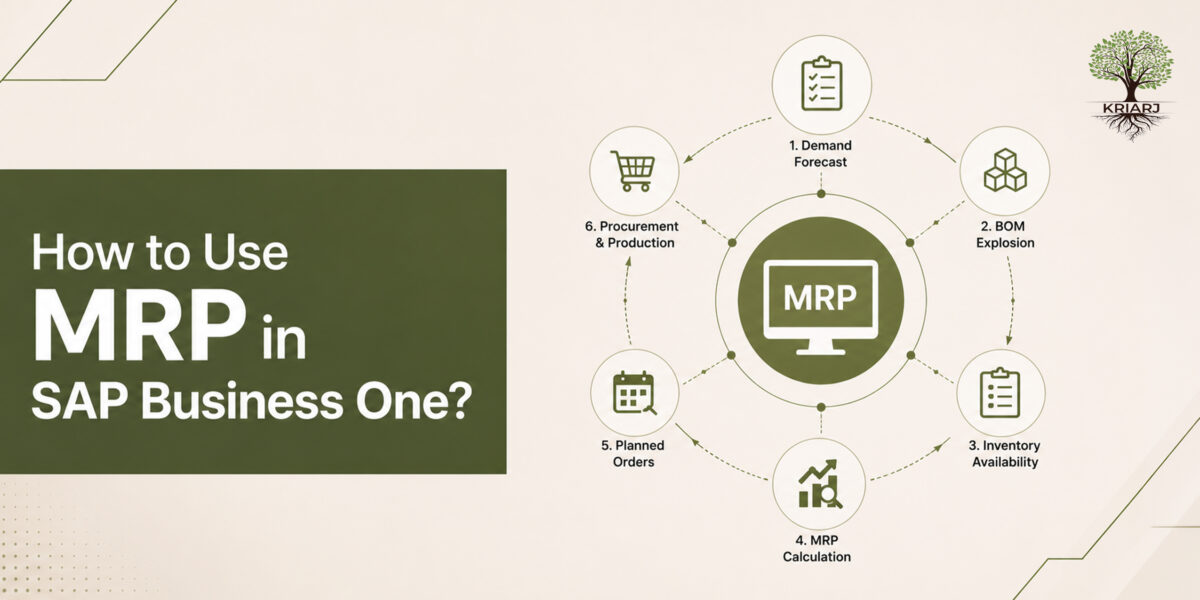
We worked with the client to actually switch this on and use it as intended: configuring MRP to pull demand directly from sales orders and forecasts, current inventory, open purchase and production orders, item lead times, and BOM structures — and generate system-driven recommendations for what to buy and what to produce, and when.
Implementation: Getting MRP Ready for Real Use
Turning MRP on isn’t just a configuration switch — it only produces trustworthy recommendations once the data feeding it is right. Our implementation covered:
Item master planning parameters — lead times, order/production policies (make vs. buy), minimum order quantities, and safety stock levels reviewed and set correctly for every planned item
BOM accuracy — validated so that material requirements calculated from production orders reflected real consumption
MRP scenarios and run configuration — setting up planning horizons, order recommendation logic, and how the system should net available stock against demand
Training and change management — walking the planning team through reading and acting on MRP recommendation reports, converting them into purchase and production order proposals, and building trust in the system’s output before fully retiring the spreadsheet
The Result: A Full Shift to System-Based Planning
The client has now moved material requirement planning entirely into SAP B1. Every planning cycle runs through the MRP engine, and the resulting recommendations are reviewed and converted directly into purchase and production orders inside the system — no parallel spreadsheet, no manually rebuilt demand-supply picture.
This has meaningfully solved the core material planning problem: requirements are calculated consistently, tied directly to live sales orders and inventory positions, and visible to everyone who needs them — not just the person who used to maintain the spreadsheet.
An Honest Limitation Worth Knowing
MRP in SAP B1 plans for material — what needs to be procured or produced, and by when, based on demand and BOM structure. It does not, on its own, account for machine capacity, shop-floor scheduling constraints, or resource availability. A material plan can say “produce 500 units by Thursday” without knowing whether the relevant machine or work center actually has the capacity to do so in that window.
For this client, that’s a known and accepted trade-off: MRP has fully solved the material requirement side of planning, which was the original and most pressing problem. Capacity and scheduling constraints are managed as a separate, complementary step outside MRP’s scope — and that’s a reasonable place to draw the line for a business at this stage, rather than trying to force a single module to do a job it isn’t designed for.
The Bigger Lesson
A lot of value sitting inside an already-implemented ERP goes unused simply because a module wasn’t prioritized at go-live. Revisiting native functionality like MRP — cleaning up the master data behind it and actually adopting it operationally — can solve a real, ongoing planning problem without adding a new system, a new integration, or a new point of failure.
It’s equally important to be clear-eyed about what a module does and doesn’t do. MRP solves material planning. It isn’t a capacity planning tool, and setting that expectation correctly from day one is part of what makes an adoption like this stick.
Kriarj Business Consultants Private Limited helps businesses get more value from the SAP Business One they already have — configuring and operationalizing native functionality like MRP, and building the master data discipline behind it. If your material planning still lives in a spreadsheet, get in touch and we’d be glad to take a look.